
Getting Started with Yespo AI: Launch Smarter, Faster Campaigns
Getting Started with Yespo AI: Launch Smarter, Faster Campaigns
Yespo’s AI capabilities help ecommerce teams create content, optimize campaigns, personalize product selections, and analyze performance with less manual work.
You can use AI throughout the customer journey: connect an external AI agent to your Yespo account, generate message content, continuously test message variants, target contacts with a high purchase probability, and show relevant products across channels.
AI Agents
Build Workflows in a Chat
Intelligent Campaign Optimization
Product Recommendations
Generative AI
AI Agents for Yespo
Yespo connects Claude Code, Claude Cowork, and OpenAI Codex directly to your account through the Yespo MCP server.
Instead of opening the platform for every task, describe the required result in plain language. The agent can retrieve supported Yespo data, use approved tools, and return the result in the same conversation.
The Yespo plugin includes reusable skills for three common workflows:
- Email editing — read, clone, translate, and update email templates while preserving their builder HTML and CSS structure.
- Email deliverability audits — combine Yespo deliverability data with public SPF, DKIM, DMARC, MX, domain, short-link, and SSL checks.
- Messaging analytics — download Yespo analytics exports and calculate rankings, rates, trends, and comparisons from the underlying rows.
Use the same plugin repository with:
- Claude Code or Claude Cowork
- OpenAI Codex
Research PreviewYespo integrations with AI agents are available as a research preview. Available tools, skills, and setup steps may evolve.
Explore Yespo AI-agent capabilities and setup options →
Build Workflows in a Chat
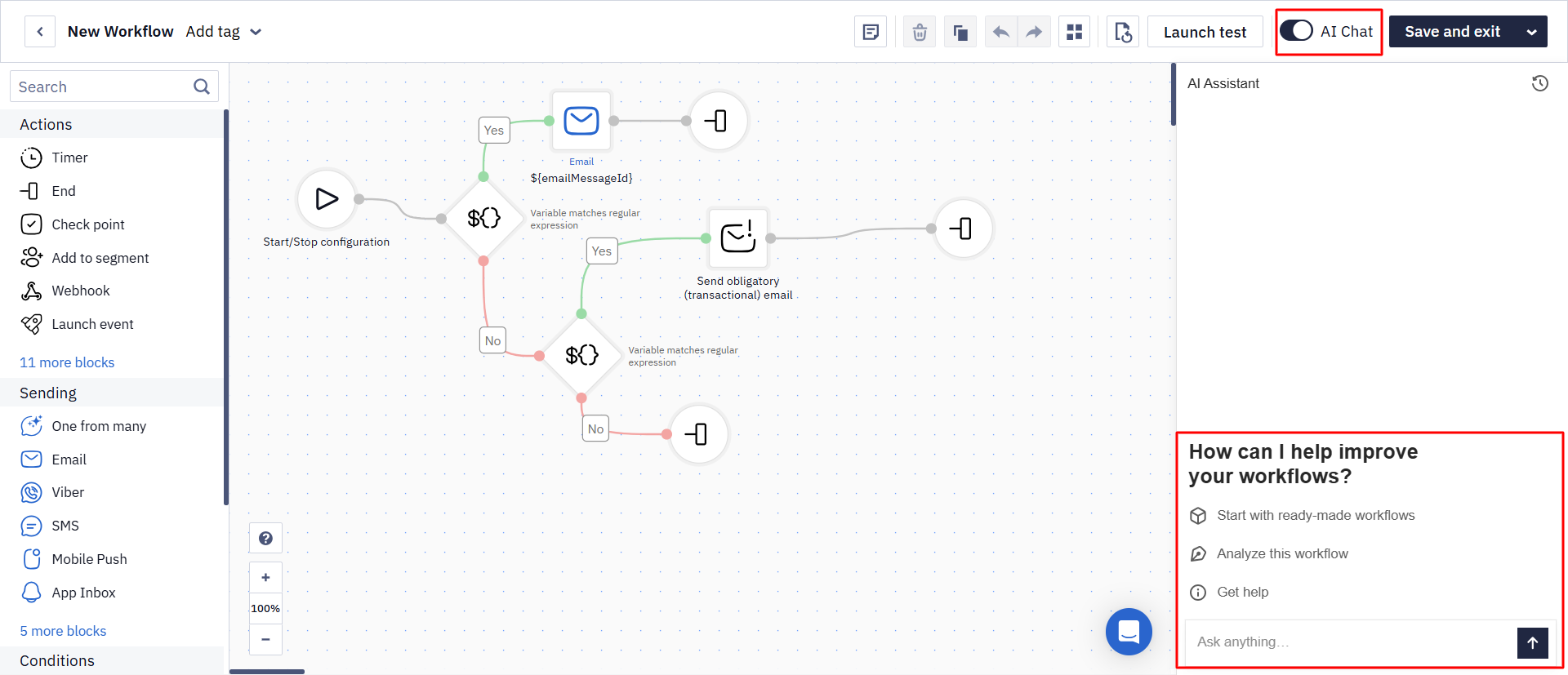
The AI Assistant is a chat built into the workflow editor. Instead of adding and configuring every block by hand, describe the logic you need: the assistant builds the workflow, edits an open one, analyzes its structure and settings with suggested fixes, and answers questions about blocks. It replies in the language of your prompt.
To open it, go to the workflow editor and enable the AI Chat toggle in the top toolbar.
Get started with the AI assistant >
Intelligent Campaign Optimization
Using One from Many Message Block
The One from many block continuously tests several messages in the same workflow and adjusts their selection probability based on performance.
Use it to:
- Automate ongoing message testing without creating separate workflow branches.
- Add new ideas without rebuilding the workflow.
- Increase the share of better-performing messages over time.
- Reduce repetition when the same contact enters the workflow more than once.
- Exclude variants that consistently underperform.
For example, add several abandoned-cart emails with different subject lines, offers, or creative approaches. Yespo will test the variants and prioritize those that generate stronger engagement.
NoteThe One from many block is designed for continuous optimization. Add new variants and review their performance regularly to keep the message set relevant.
Learn how to use the One from many block →
Creating Predictive Segments
Predictive segmentation helps you focus campaigns on contacts who are more likely to purchase.
Yespo analyzes historical behavior and assigns contacts to segments based on their predicted purchase probability within the next 30 days.
Orders sent as events are taken into account by predictive segmentation on two conditions: the event has actually created an order (you can check this on the Orders tab of the contact profile), and the product identifiers from the order are present in the product feed.
Use these segments to:
- Prioritize audiences for sales and limited-time campaigns.
- Reduce unnecessary sends and messaging costs.
- Target contacts with a higher probability of converting.
- Compare different communication strategies for high- and low-propensity audiences.
You can also export data to BigQuery and build custom predictive models, such as churn forecasts, outside Yespo.
Learn more about segmentation →
AI-Powered Product Recommendations
Yespo uses product data and customer behavior to select relevant items for each contact. Recommendations can appear on your website, in a mobile app, or in messages.
Recommendations on the Website
Place recommendation blocks on key pages, including:
- Homepage.
- Category and product pages.
- Shopping cart and checkout.
Depending on the placement and selected algorithm, the block can show trending products, recently viewed items, similar products, complementary items, or personalized selections.
Recommendations update dynamically according to customer behavior, product availability, and the configured data source.
Set up recommendations on your website →
Recommendations in Mobile App
Use personalized recommendations in your app to help customers discover relevant products and continue shopping.
Available use cases include:
- Alternatives for unavailable products.
- Cross-sell and upsell suggestions.
- Products purchased by similar customers.
- Personal selections based on browsing and order history.
- Custom recommendation logic.
Display these selections on the app homepage, product screens, or dedicated recommendation sections.
Set up recommendations in a mobile app →
Recommendations in Messaging Channels
Add dynamic product recommendations to triggered and broadcast messages. Yespo selects the products for each recipient when the message is generated, helping keep prices, availability, and selections current.
Common use cases include:
- Abandoned cart and abandoned browse campaigns.
- Post-purchase cross-sell campaigns.
- Price-drop and back-in-stock notifications.
- Personalized promotional emails.
Set up recommendations for triggered campaigns →
Generative AI
AI-Powered Email Content
The Yespo email editor includes AI tools for creating and refining copy without leaving the message.
Use them to:
- Generate text from a prompt.
- Rewrite existing content.
- Correct spelling and grammar.
- Adjust the tone or emotional impact.
- Translate text.
AI can help prepare body copy, subject lines, preheaders, and CTA text. Always review generated content, links, dynamic variables, and claims before sending the email.
Learn how to use AI in the email editor →
AI-Generated Mobile Push Messages
The One from many block can generate Mobile Push copy based on a short description of your campaign.
Create several variants, select the ones you want to use, and let the block test their performance automatically.
For example, start with:
Promote the new outerwear collection.
The generator can create multiple concise versions with different tones and calls to action. Review the suggestions and keep only the messages that match your brand and campaign goal.
Learn how to generate Mobile Push messages →
Combine Yespo AI Capabilities
These tools are most effective when used together:
- Use predictive segments to select audiences with higher conversion potential.
- Add product recommendations to personalize each message.
- Generate and refine copy with AI.
- Use the One from many block to test variants continuously.
- Analyze results with the Yespo AI-agent analytics skill.
This approach reduces routine work while keeping targeting, content, product selections, and performance analysis connected in one campaign process.
Updated about 2 months ago