
Sending Past Events
If you have migrated from another service or just created an account in our platform, and you have a history of
- offline orders,
- contact activity,
- subscriptions,
- or other events you want to use for advanced segmentation,
you can transfer the available data from your CRM or other data store to our system via the API resource Generate past events.
ImportantThe type of a historical event isn't created automatically. Create the event type and enable it for segmentation before importing — otherwise, the API returns the
EVENT_SEGMENTATION_DISABLEDerror.If your tariff plan does not include segmentation by events, please submit a request to [email protected]
By default, historical events are accepted with a depth of up to 366 days. For older events, the API returns the
OCCURRED_TIME_TOO_DEPTHerror.
How to set up segmentation by events
To assign events to contacts, pre-import the contact database to your account.
For example, you have a certain number of orders over the past year, and you want to build a segment with customers interested in a certain type of products or services, get statistics on the average order value, or segment contacts by geodata (if applicable).
Convert these orders into a JSON format supported for API according to the specification, and send them to the system. You can send an array of up to 500 such events within one request. Specify the time of each event in the field occurred:
- format of date:
YYYY-MM-DD; - format of date with the time:
YYYY-MM-DDThh:mm:ss±hh:mm.
Important
- The date event parameter must be passed in the
ISO 8601format with a specified time zone offset relative to UTC. For example:2025-01-05T13:00:00+02:00, where +02:00 indicates that the local time is 2 hours ahead of UTC.- Note that some countries observe daylight saving time (DST), which may affect the offset.
For example, you send an order of two mobile devices bought at a few years interval:
{
  "events": [
    {
      "eventTypeKey": "orderCreated",
      "keyValue": "test_v3_event_1",
      "params": {
        "phone": "380501234789",
        "externalOrderId": "12345679102",
        "externalCustomerId": "AA1100",
        "totalCost": "258.0",
        "status": "INITIALIZED",
        "date": "2025-01-05T13:00:00+02:00",
        "currency": "UAH",
        "items": [
          {
            "externalItemId": "200600",
            "name": "Super Device",
            "category": "devices",
            "quantity": 2,
            "cost": 999,
            "url": "http://example.com/item/200600",
            "imageUrl": "http://example.com/item/200600/image.png",
            "description": "High quality"
          }
        ]
      },
      "occurred": "2025-02-04T12:00"
    },
    {
      "eventTypeKey": "orderCreated",
      "keyValue": "test_v3_event_1",
      "params": {
        "phone": "380500000001",
        "externalOrderId": "12345679103",
        "externalCustomerId": "AA1111",
        "totalCost": "258.0",
        "status": "INITIALIZED",
        "date": "2025-01-07T13:00:00+02:00",
        "currency": "UAH",
        "items": [
          {
            "externalItemId": "200600",
            "name": "Super Device",
            "category": "devices",
            "quantity": 2,
            "cost": 999,
            "url": "http://example.com/item/200600",
            "imageUrl": "http://example.com/item/200600/image.png",
            "description": "High quality"
          }
        ]
      },
      "occurred": "2025-02-07T16:00"
    }
  ]
}
NoteHistorical order events uploaded via Generate past events create orders and appear in the Orders section, the same as orders sent with Add orders. An event type has to have segmentation enabled for its past events to be accepted: without it the response carries
EVENT_SEGMENTATION_DISABLEDand the event isn't saved.
Events are processed asynchronously, and the processing order is not guaranteed. For historical data, the reference point is the time passed inside the event itself (the occurred field), not the order in which requests are processed.
Generate past events accepts up to 100 requests per second, while Generate event accepts up to 350. See Rate limits for the full list.
Apart from basic fields with the name, price, and link to a product, you can send any related data that is available to build segments. For example, you can send the country and city of the buyer to use for segmentation by geolocation.
{
  "city": "Los Angeles",
  "country": "USA"
}
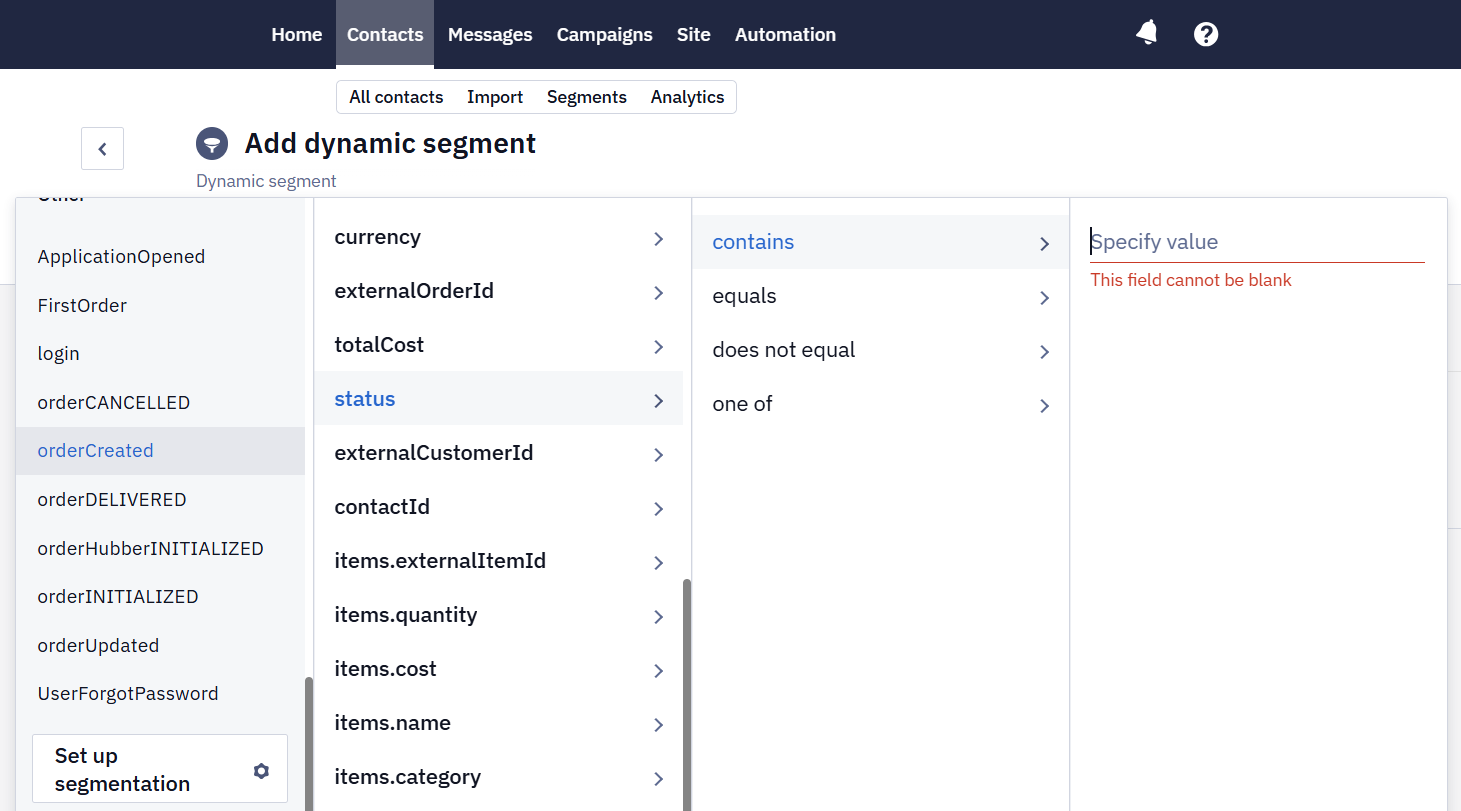
Based on the available datasets you can build dynamic segment:
You can also delete old or irrelevant events. To do this, send a request to the same resource, but using the method type DELETE. The time range is mandatory — specify it in the request body:
{
  "from": "2019-06-04T10:47",
  "to": "2020-01-04T13:33"
}
The DELETE method is inactive by default. To activate it, please contact our support team.
Scope, limits, and behavior
- The method removes only historical events that were previously uploaded through Generate past events V3. It does not remove events sent through Generate event v3, which are cleared automatically once their retention period expires. It does not remove historical orders either — those are removed by a separate resource, Remove orders.
- Both bounds of the
from/torange are inclusive. The endpoint accepts an exact time in UTC, not just a date.- The published rate limit is 5 requests per second.
- If the feature is not enabled for your organization, the endpoint returns 403 with a message stating that the organization is not enabled for events removing.
- Processing is asynchronous and has no fixed SLA. The response confirms that the request was accepted, not that deletion has finished. Events are processed day by day, so the total duration depends on the amount of data.
- If some data has already aged out of the main storage under its TTL, the method does not remove it from segmented history.
- Events the resource has removed disappear from segmentation and from the contact's history but stay in the Event Analytics report: its data is collected hourly and isn't recalculated after a deletion.
Updated 10 days ago