
Transferring Website Behavior Data via JavaScript Requests
To transfer website data to our platform, you need to install the web tracking script on your site. After, you'll be able to send the user behavior data and use it to create personalized product recommendations for the site and for your emails.
We encrypt and safely store in our system the contact data received in events, like email addresses, phone numbers, and others.
You can send events through one of the methods:
- Using eS.JS;
- Using REST API.
If you only need to pass an event to start a workflow and don't need to track behavior on the site, the web tracking script isn't required: send the event with the Generate event resource.
Note
- Pay special attention to the transfer of contact data
- There is no need to configure all the events below — select only those included in your tariff plan
List of Events
- Basic:
- ProductPage
- StatusCart
- PurchasedItems
- CustomerData
- Advanced:
- ProductPage
- StatusCart
- PurchasedItems
- CustomerData
- CategoryPage
- SearchRequest
- AddToWishlist
- Recommendations on the site:
- ProductPage
- StatusCart
- PurchasedItems
- CustomerData
- CategoryPage
- MainPage
- NotFound
- ProductImpression
Check the sending of events and their parameters in the browser console on the Network tab. Tracking events are called webevent.
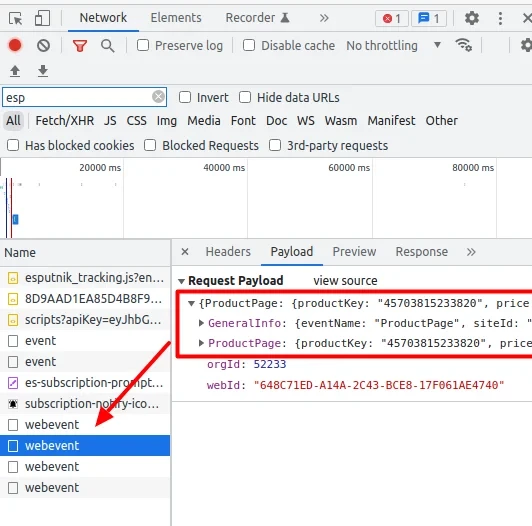
Script
Script eS
Purpose
The script tracks what page a visitor is browsing and allows to send events from any page where it is installed.
Installation
The script should be installed on all pages of your site before the closing tag body.
It can be installed by using GTM but it can result in traffic loss as almost all content filters block GTM.
- GTM (Google Tag Manager) is a tag management system that allows you to install user scripts on the site pages without interfering with its code.
- Content filters (content-control software or web filtering software) is a tool or software that filters sites by content and blocks access to certain sites with content unavailable for viewing.
NoteThe script loads asynchronously (
s.async = 1in the snippet below), so by design it doesn't block the rest of the page from rendering. If a page still seems slow and you suspect the script, the fastest way to check is to temporarily remove it and re-measure load time — in a confirmed case, a page was already slow before any scripts had loaded, which pointed to the page's own content (unrelated to this script) as the cause.
Example
<script>
!function(t, e, c, n) {
    var s = e.createElement(c);
    s.async = 1, s.src = 'https://cdn.esputnik.com/scripts/' + n + '.js';
    var r = e.scripts[0];
    r.parentNode.insertBefore(s, r);
    var f = function() {
        f.c(arguments);
    };
    f.q = [];
    f.c = function() {
        f.q.push(arguments);
    };
    t['eS'] = t['eS'] || f;
}(window, document, 'script', '000000000000000000');

eS('init', {
    TRACKING: false,
    RECOMS: true
});
</script>
Parameters
| Name | Example | Description |
|---|---|---|
| script | "00000000000000000"Required Type: string | Static parameter with a store's ID |
| TRACKING | trueOptional (true by default) Type: boolean | When sending events via es.JS, the value should be set as false, while the automatic dispatch of the PageView event on page reload remains |
| RECOMS | trueOptional (true by default) Type: boolean | Recommendation display through configuration (can work without TRACKING, but crawler config should be described) |
Page View
PageView
Description
Sending the PageView event - occurs automatically when the page is reloaded. If you have a one-page site and the page does not reload when navigating to other sections, you can configure the event transmission yourself.
Example
eS('sendEvent', 'PageView', {
 'PageView': { }
});
Site Visitor Data
In all events (optional, not mandatory)
Description
Sending events from all pages with a visitor ID (email, phoneNumber, contactId).
Necessary to match contacts with Cookies.
Example
{
	"GeneralInfo": {
		"externalCustomerId": "1234509876",
		"user_email": "[email protected]",
		"user_phone": "380501234567",
		"user_es_contact_id": 100500,
		"marketId": "Lviv_center_2"
	},
	"ProductPage": {
		"productKey": "24-WG02"
	}
}
Parameters
| Name | Example | Description |
|---|---|---|
| externalCustomerId | "1234509876"Optional Type: string | External identifier generated in your system |
| user_email | "[email protected]"Optional Type: string | Contact's email |
| user_phone | "380501234567"Optional Type: string | Contact's phone number |
| user_es_contact_id | "100500"Optional Type: string | With connected web push token collection, this contact identifier is located in the browser's internal storage: Local Storage > esWebPushContactId |
| marketId | "Lviv_center_2"Optional Type: string | Identifier of the store/point of sale. If provided, updates the Market ID field in the contact card |
Basic Segmentation Events
Product Card
ProductPage
Description
Sending a ProductPage event, a product card with availability, price and code of the product.
Necessary to calculate and display recommendations and send abandoned views.
Example
eS('sendEvent', 'ProductPage', {
        'ProductPage': {
            'productKey': '24-MB02',
            'price': '153',
            'isInStock': 1,
            'tag_some_field': ['123'],
            'tag_another_field': ['321', '213']
        }});
NoteBy default,
productKeymust exactly match the<g:id>parameter in the product feed, and the sameproductKeymust be passed consistently in theProductPage,StatusCart, andPurchasedItemsevents. If the product ID is passed in another feed parameter, that is not a self-service setting — it has to be agreed with [email protected] for your specific account.Also pay attention to the data type in the price and isInStock parameters.
Example
eS('sendEventWithTags', 'ProductPage', {
  "ProductPage": {
    "Product": {
      "productKey": "72354",
      "price": "754 USD",
      "isInStock": 1,
      "tag_something": [
        "abc",
        "bca"
      ]
    },
    "Tags": {
      "some_tags": [
        "some_tag1",
        "some_tag2"
      ]
    }
  }
});
Parameters
| Name | Example | Description |
|---|---|---|
| productKey | "24-MB02"Required Type: string | • Any product ID from the feed • Should match the productKey of the StatusCart event |
| price | "153"Optional Type: string | • The price per item can be sent with the currency value |
| isInStock | 1Optional Type: int | • Indicates if items are in stock • Can have two values: 0 – items are out of stock, 1 – items are in stock |
| Tags | Optional Type: object | Additional fields |
Cart
StatusCart
Description
The cart is sent as an array of data. The event must be sent every time:
- when adding a product to the cart from the category, product and home pages
- when deleting an item from the cart in a pop-up window or on the cart/checkout page
- when emptying the cart (if possible)
The StatusCart event does not convey the fact of adding a specific product to the cart, but the current state of the cart. If the first product is added to the cart, then an array with one product is sent in the StatusCart event. If a 2nd, 3rd, etc. products are added, then an array of 2, 3, etc. products is transmitted in the StatusCart events. The same logic works when removing items from the cart.
GUID parameter. In each StatusCart event, a GUID parameter must be passed. This is a unique identifier of the current state of the cart. Every time you send a StatusCart event, you need to send a new GUID value that will be different from the previous ones.
Example (cart with added items)
eS('sendEvent', 'StatusCart', {
   'StatusCart': [
       {
           'productKey': '24-MB02',
           'price': '153',
           'quantity': '1',
           'currency': 'USD',
           "tag_something": [
               "aaa",
               "bbb"
           ]
       }, {
           'productKey': '123-321',
           'price': '450.00',
           'quantity': '3',
           'currency': 'USD'
       }
   ],
   'GUID': '2b914e9c-43ee-bf41-6f80-b97db1e8ab7e'
});
If you need to send additional event parameters, use a different construction
Example
eS('sendEventWithTags', 'StatusCart', {
  "StatusCart": {
    "GUID": "6F9619FF-8B86-D011-B42D-00CF4FC964FF",
    "Products": [
      {
        "productKey": "430738",
        "price": 201.95,
        "discount": 180,
        "quantity": 1,
        "price_currency_code": "UAH",
        "tag_something": [
          "aaa",
          "bbb"
        ]
      },
      {
        "productKey": "902339",
        "price": 596,
        "discount": 590,
        "quantity": 1,
        "price_currency_code": "UAH",
        "tag_something": [
          "aaa",
          "bbb"
        ]
      }
    ],
    "Tags": {
      "some_tags": [
        "1",
        "a2"
      ],
      "some_tags1": [
        "4",
        "gg"
      ]
    }
  }
});
Example (empty cart)
eS('sendEvent', 'StatusCart', {
            'StatusCart': [],
            'GUID': '2c914e9c-43ee-bf41-6f80-b97db1e8ab7e'
        });
Parameters
| Name | Example | Description |
|---|---|---|
| GUID | "2c914e9c-43ee-bf41-6f80-b97db1e8ab7e"Required Type: string | • Unique ID that connects two events – StatusCart and PurchasedItems • Should be identical to the GUID of the PurchasedItems event • Can be generated of random numbers and Latin characters • GUID is a link between the last cart and purchase • Should be unique for every cart status. It's a 128-bit ID presented as 32 hexadecimal (base-16) digits, displayed in five groups separated by hyphens |
| productKey | "24-MB02"Required Type: string | • Any product ID from the feed • Should match the productKey of the ProductPage event |
| price | "153"Required Type: string | The price per item can be sent with the currency value |
| quantity | "5"Required Type: string | Quantity of items |
| currency | "USD"Optional Type: string | Currency |
| Tags | Optional Type: object | Additional fields |
Purchase
PurchasedItems
Description
To show recommendations on the order confirmation page or to send abandoned cart triggers, you need to send a request specifying the purchased item.
If you don't send abandoned cart triggers, you can send the items in the PurchasedItems event, without StatusCart.
Orders transferred through web tracking don't create a separate event type — they are processed by the same mechanism as orders sent via the Add orders API resource.
Fake orders sent through web tracking raise the question of blocking them by IP address. The address behind an event is technically available, and a specific one can be blocked on request — contact support. As a defence, though, blocking is of little use: such addresses are usually dynamic, so the same address can later belong to a legitimate visitor, and once an address is blocked, no requests from it get through at all — not only the tracking ones.
Example (purchase in one click)
eS('sendEvent', 'PurchasedItems', {
    "OrderNumber": "123/2017",
    "PurchasedItems": [{
        "productKey": "24-MB02",
        "price": "153",
        "quantity": "1",
        "currency": "UAH"
    }],
    "GeneralInfo": {
        "marketId": "Lviv_center_2"
    },
    "Tags": {
        "blockId": ["19787_r119v224"]
    }
});
NoteThe PurchasedItems event also contains a GUID parameter. There is no need to generate a value for this parameter. Use the GUID value from the last StatusCart event.
If you need to send additional event parameters, use a different construction
Example
eS('sendEventWithTags', 'PurchasedItems', {
  "PurchasedItems": {
    "Products": [
      {
        "product_id": "430738",
        "unit_price": "201.95",
        "quantity": 1
      },
      {
        "product_id": "211452",
        "unit_price": "341.80",
        "quantity": 2
      }
    ],
    "OrderNumber": "123/2017",
    "Tags": {
      "block_id": [
        "21246_r335v507"
      ],
      "some_tags1": [
        "4",
        "gg"
      ]
    }
  },
  "GeneralInfo": {
    "marketId": "Lviv_center_2"
  }
});
Example (purchase from the site)
eS('sendEvent', 'PurchasedItems', {
    "OrderNumber": "123/2017",
    "PurchasedItems": [{
        "productKey": "24-MB02",
        "price": "153",
        "quantity": "1",
        "currency": "UAH"
    }],
    "GeneralInfo": {
        "marketId": "Lviv_center_2"
    },
"GUID": "6F9619FF-8B86-D011-B42D-00CF4FC964FF"
});
If you need to send additional event parameters, use a different construction
Example
eS('sendEventWithTags', 'PurchasedItems', {
  "PurchasedItems": {
    "GUID": "6F9619FF-8B86-D011-B42D-00CF4FC964FF",
    "OrderNumber": "123/2017",
    "Tags": {
      "some_tags": ["1", "a2"],
      "some_tags1": ["4", "gg"]
    }
  },
  "GeneralInfo": {
    "marketId": "Lviv_center_2"
  }
});
Parameters
| Name | Example | Description |
|---|---|---|
| OrderNumber | "123/2017"Required Type: string | Order number |
| GUID | "6F9619FF-8B86-D011-B42D-00CF4FC964FF"Required Type: string | • Unique ID that connects two events – StatusCart and PurchasedItems • Should be identical to the GUID of the StatusCart event • Can be generated of random numbers and Latin characters • GUID is a link between the last cart and purchase • Should be unique for every cart status. It's a 128-bit ID presented as 32 hexadecimal (base-16) digits, displayed in five groups separated by hyphens |
| productKey | "PK1"Required Type: string | • Any product ID from the feed • Should match the productKey of the ProductPage event |
| price | "21.70"Required Type: string | The price per item can be sent with the currency value |
| quantity | "1"Required Type: string | Quantity of items |
| currency | "USD"Optional Type: string | Currency |
| Tags | Optional Type: object | Additional fields |
| blockId | Optional Type: string | • Taken from the URL parameter sc_content= • If there is no such parameter in the URL, blockId and its value are not sent |
Customer
CustomerData
Description
To send abandoned cart and abandoned browse triggers, you need to send a request with the customer data. Apart from abandoned cart and abandoned browse emails, it can be used in order confirmations and registration confirmations.
CustomerData should be sent:
- when registering on the site
- when logging in to the site
- when entering personal data on the checkout page. If the user is already authorized by the time the order is placed, you do not have to send this event.
- from the personal account if the user updates information (adds/changes phone number or email)
Sending customer data at registrationWhen registering a user, in addition to the CustomerData event, transfer a contact to the system with the Add/update a contact method — the CustomerData event itself doesn't create a contact in Yespo. If tracking is also configured in the mobile application, pass the
externalCustomerIdparameter, your internal contact ID, in the contact creation request as well.Web tracking events are processed asynchronously, through a queue. Send CustomerData first and PurchasedItems after it: sent at the same moment, the order may not be linked to the contact and will be skipped.
The script sends the identifiers —
externalCustomerId, email, and phone number — in a separate webcontact event, which you see in Network next to CustomerData. On a repeat login webcontact is not sent, so CustomerData goes without the identifiers.Pass the phone number and email in their normal form. Hashed values aren't accepted as identifiers — a contact can't be matched by them, and the web tracking script hashes identifiers itself in the browser before the data leaves the page. You can send CustomerData with an email address alone, without a phone number; if the event carries no identifier at all, the visitor stays unidentified until an event with an email address arrives.
Example
eS('sendEvent', 'CustomerData', {
    'CustomerData': {
        'externalCustomerId': '1234509876',
        'user_email': '[email protected]',
        'user_name': 'Johny',
        'user_card_id': '321',
        'user_phone': '3801111111111',
        'user_city': 'Gdańsk',
        'user_tags_gender': 'male',
    }
});
Parameters
| Name | Example | Description |
|---|---|---|
| externalCustomerId | "1234509876"Optional Type: string | External identifier generated in your system |
| user_email | "[email protected]"Required Type: string | User's email is necessary to send abandoned carts and browses |
| user_name | "John"Optional Type: string | User name |
| user_card_id | "321"Optional Type: string | User card ID |
| user_phone | "3801111111111"Required Type: string | Phone number in the international format |
Additional Events for Advanced Segmentation (Pro Plan)
Category
CategoryPage
Description
To show recommendations on the category page, you need to send a request specifying what category the user is viewing.
NotecategoryKey must match the category names in the feed. If the categories in the feed are transferred like this:
<g:google_product_category>Shoes > Sneakers > Running Sneakers</g:google_product_category>, then in the categoryKey you need to transfer Shoes, Sneakers or Running Sneakers, respectively. If the category is in the form of an identifier, then in the feed you should change it to an identifier. From a technical point of view, it does not matter which option is chosen, but from a practical point of view, it is better to use the category names.
Example
eS('sendEvent', 'CategoryPage', {
    "CategoryPage": {
        "categoryKey": "Babies"
    },
    "Tags": {
        "some_tags": [
            "gh",
            "a2"
        ],
        "some_tags1": [
            "4",
            "gg"
        ]
    }
});
If you need to send additional event parameters, use a different construction
Example
eS('sendEventWithTags', 'CategoryPage', {
  "CategoryPage": {
    "Category": {
      "categoryKey": "Babies"
    },
    "Tags": {
      "some_tags": [
        "1",
        "a2"
      ],
      "some_tags1": [
        "4",
        "gg"
      ]
    }
  }
});
Parameters
| Name | Example | Description |
|---|---|---|
| categoryKey | "Babies"Required Type: string | • Category ID • Can be a category name or any other ID available in the feed |
| Tags | Optional Type: object | Additional fields |
Wishlist
AddToWishlist
Description
Sending the AddToWishlist event - at the time of adding a product to the wish list (favorites).
Necessary for calculating and displaying recommendations and sending triggers related to the wish list.
Example
eS('sendEvent', 'AddToWishlist', {
        'AddToWishlist': {
            'productKey': '24-MB02',
            'price': '153',
            'isInStock': 1
        }});
Parameters
| Name | Example | Description |
|---|---|---|
| productKey | "24-MB02"Required Type: string | • Any product ID from the feed |
| price | "153"Optional Type: string | • The price per item can be sent with the currency value |
| isInStock | 1Optional Type: int | • Indicates if items are in stock • Can have two values: 0 – items are out of stock, 1 – items are in stock |
Search requests
SearchRequest (optional)
Description
To collect statistics on search queries, you need to send the value from the search line.
Use this event for triggers. Send it only if the search returned no results. In the trigger, such contacts will receive personal recommendations (at the moment, recommendations don't depend on the value entered in the search; we will support this feature in the nearest future).
Example
eS('sendEvent', 'SearchRequest', {
    "SearchRequest": {
"search":"input_value",
"isFound": 0
}
});
Parameters
| Name | Example | Description |
|---|---|---|
| search | "Coffee"Required Type: string | Value from the search string. What we are looking for on the site. |
| isFound | 0Optional Type: int | The event is sent only if "isFound": 0 |
Additional Events Required for Recommendations on the Site
Product Card (Additional Settings)
ProductPage
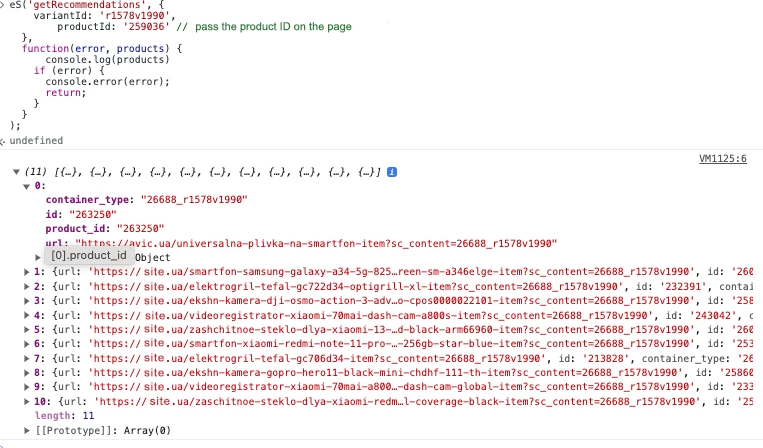
If in the recommendation block the product is immediately added to the cart when the Buy button is clicked, it is necessary to send an additional ProductPage event, and in GeneralInfo in s_location pass the sc_content parameter, which can be obtained from the link of the target product received in the recommendations.
If the cart/checkout page does not send StatusCart (there were no changes to the cart), but needs to display the cart recommendation block, send an event eS('sendEvent', 'StatusCartPage').
Main Page
MainPage
Description
Sending the MainPage event.
Necessary to display recommendations on the site.
Example
eS('sendEvent', 'MainPage');404 Page
NotFound
Description
Sending the NotFound event.
Necessary to display recommendations on the site.
Example
eS('sendEvent', 'NotFound');Impressions
ProductImpression
If you set up calling recommendations through the JS API, you must call the ProductImpressions method when a recommendation appears in the user's browser viewport (when the user sees the recommendation) so tracking works correctly. You could use the Intersection Observer API to detect element visibility to a user or any other method of your choice. The request must contain the parameters that were returned in the getRecommendations response: product identifiers and a container_type containing the block ID and variant_id.
Description
To show impressions for recommendation blocks in Reports, you need to send a request with data on the displayed items.
Example
eS('sendEvent', 'ProductImpressions', {
    "ProductImpression": [{
        "product_id": "430968",
        "container_type": "1253_r963v1317"
    }]
});
If you need to send additional event parameters, use a different construction
Example
eS('sendEventWithTags', 'ProductImpression', {
  "ProductImpression": {
    "Products": [
      {
        "product_id": "430968",
        "container_type": "1253_r963v1317"
      },
      {
        "product_id": "430738",
        "container_type": "1253_r963v1317"
      },
      {
        "product_id": "429983",
        "container_type": "1253_r963v1317"
      }
    ],
    "Tags": {
      "some_tags": [
        "1",
        "a2"
      ],
      "some_tags1": [
        "4",
        "gg"
      ]
    }
  }
});
Parameters
| Name | Example | Description |
|---|---|---|
| product_id | "PK1"Required Type: string | ID of the displayed item |
| container_type | "1253"Required Type: string | Recommendation block number |
| Tags | Optional Type: object | Additional fields |
If there are several blocks on one page, all impressions are sent in one request.
Updated 14 days ago