
SMS Sender ID
SMS sender ID is the company or brand name that makes the sender identifiable to the SMS recipient.
Note
- Alphanumeric sender ID can contain only upper and lower case Latin letters, numbers, space, a hyphen, dot, and underscore, and also no more than 11 symbols. You can’t use only numerals.
- The default SMS sender (including the 10 free SMS available to new accounts) is available regardless of the client's registration country.
Registration of an SMS sender ID
You can apply for a sender ID directly in your account when creating an SMS campaign in Yespo:
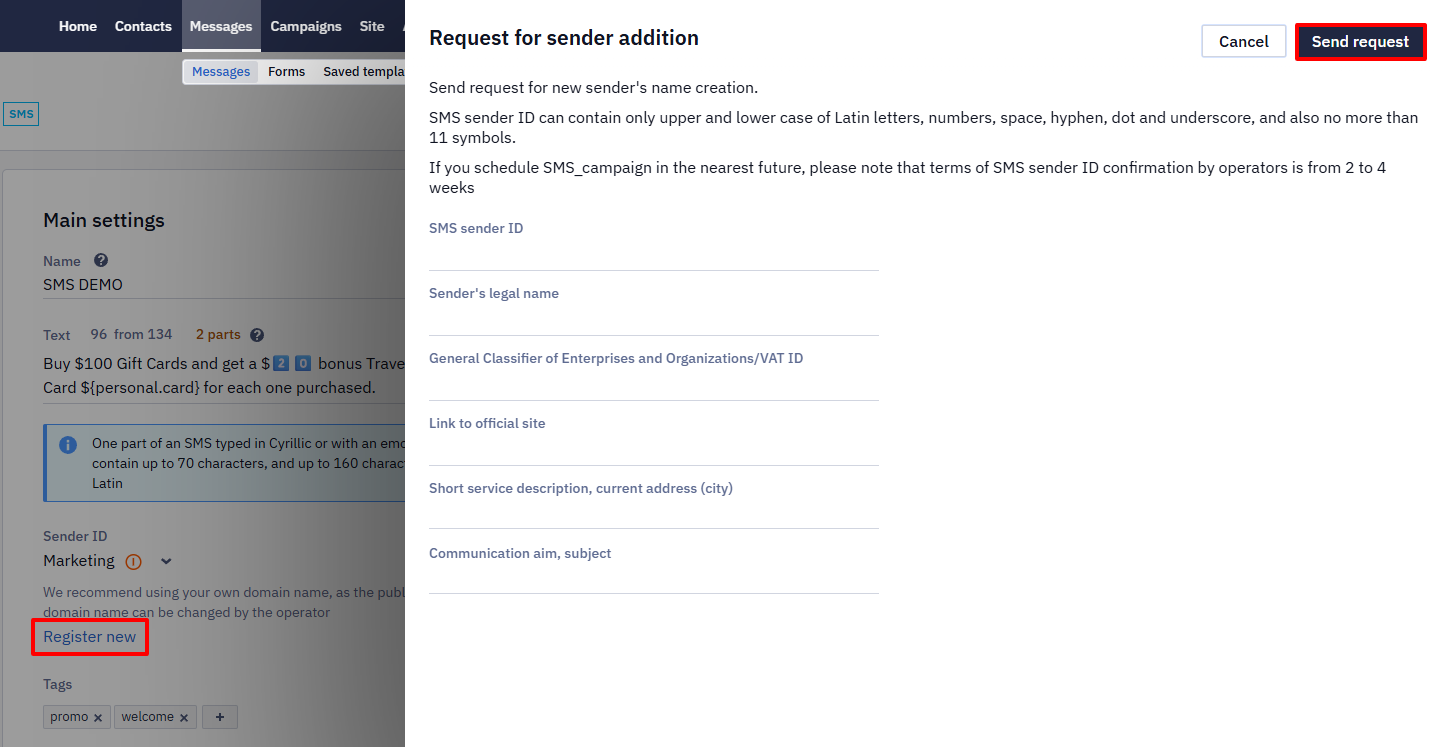
After the request is approved, you can select the registered SMS sender ID in the Sender field in the editor.
Important
- You can use different sender IDs in one account, but each should be approved separately.
- The terms of sender ID confirmation by mobile operators are from 2 to 4 weeks.
- To check whether the sender ID is already approved, send a test SMS from it — if it arrives, the name is active.
- To use brand names, you must provide confirming documents that you have the right to use a particular trademark name.
Deleting a sender ID doesn't stop SMSThe sender is written into each message as a value, not as a reference. A message saved earlier therefore keeps the name it was created with and keeps going out after the sender ID is deleted here — removing a sender only affects messages created afterwards.
There is also no switch that turns the SMS channel off for an account. If SMS keeps going out when you expect it to have stopped, the sends are being triggered from your side — a Send prepared message call, for example — so stop them there. Contact support if the channel has to be closed.
Updated 21 days ago