
Customer Identifiers and Matching
It is vital for building up and developing your business to track the customers’ actions – events – in your mobile app or on the web page. The events are customer-centric and by tracking them you can assign each one to an existing or a new customer.
The analysis of such events gives you insights into customers’ behavior and preferences helping in adjusting your communications with them.
Therefore, the proper identification of your customers by ID is a cornerstone of your marketing strategy.
In Yespo, you can collect the new customer data, and integrate and match them with the data you already have.
Duplicates are not merged at send time. Records with different contact IDs are separate contacts for the platform, so a campaign goes to both even when the address is the same, and there is no mechanism that merges them during a send.
The account does not keep a contact change history. The profile shows only the current values and the last update date; it does not show which request or field changed them.
Customer IDs in Yespo
Yespo allows the following customer identification:
- User ID (user_id). It is a unique customer ID in your system. Pass it to the Yespo External ID field.
- Email. It is used when your main focus is email campaigns.
- Mobile phone number. It is used when you contact your customers mainly using SMS.
- User pseudo ID (user_pseudo_id). It is a unique ID generated by an app when a customer installs it. The user_pseudo_id remains the same as long as a customer uses the same app instance without reinstalling it. It doesn't change on an app update. It changes when a customer uninstalls and reinstalls the app.
- Mobile push token. It is an identifier generated by push service providers and used to send push notifications to apps installed on specific devices.
- Web push token. It is an identifier generated by push service providers and used to send push notifications to web browsers.
- Telegram token. It is an identifier that is added to each subscriber of a Telegram bot or created along with the contact when transferred via the API. It is used for sending Telegram messages.
- System contact ID. It is a unique customer ID in Yespo system.
- Cookies. Those are small files containing blocks of data created and used by web servers to store stateful information on the user's device or to track their browsing activity.
- IDFA/AAID. Those are identifiers used on iOS and Android devices that allow developers and marketers to track users’ activity for advertising purposes.
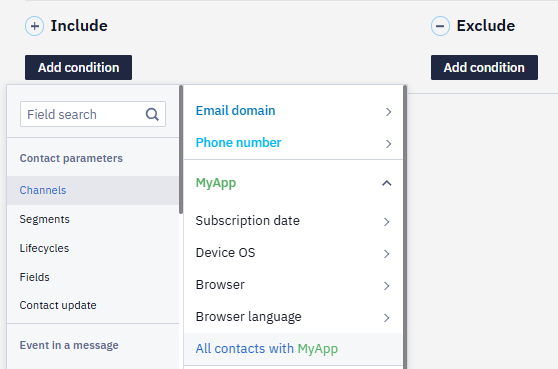
- Device ID. Device identifier of the mobile app user, which is transmitted to Yespo through the SDK. You can send App Inbox messages to users with Device ID. To select all contacts with Device IDs in your database, create a dynamic segment and include the All contacts with your app condition.
When bulk uploading contacts, there is no need to transfer Device IDs and push tokens — when users open your app, Yespo gets them through the SDK.
For anonymous users, the required identifiers to track users’ activity in Yespo are uses user_pseudo_id for mobile apps and cookies for the web.
For registered users, the following identifiers to track users’ activity in Yespo are required:
- phone number
- push token
- user ID
See detailed information on how to set the user ID in this documentation.
The source of the data tracking is BigQuery.
Matching process
The customer matching (merging) process is an important feature that permits you to identify a single customer on multiple devices and browsers.
When an anonymous customer visits your site and then your app, they are recognized as two users having different User pseudo ID (on a mobile), or a cookies file (on the web).
But when a customer signs up and logs in on both devices, they can be identified, and matched (merged) into one profile with updated customer data, overriding the older ones.
You have to define a unique customer identifier that cannot be shared by other contacts, such as a system contact ID.
Identifiers and channelsA Device ID and a mobile token may belong only to one contact. When user data is updated through the SDK by External ID and the system finds the Device ID and the mobile token belonging to another contact, they migrate to the updated one. A single contact can have several Device IDs and mobile tokens.
A contact is identified by its ID, not by a channel: with Add/update a contact you can write the same phone number or address to several contacts, and each stays a separate profile. When a request carries both an email and a phone, the contact is matched by the email, and the channel in the request replaces the contact’s existing channel of the same type.
A subscription through a widget follows a different rule: the contact is matched in the order “external ID → email and phone together → email → phone → token”, and a channel that already exists in the account — on an active or a deleted contact — is not written, so that no duplicate appears.
Unique key of mobile SDK events
The unique key of an event sent by the mobile SDK is always the Device ID, on both iOS and Android. The User ID (External User Id) identifies the contact and is used for matching profiles, but it is not the key that SDK events are recorded and searched by in Automation → Event history.
In Yespo you can upload your existing customer data in xsl, xslx, csv, and txt formats and match them with the contacts you acquired using our app.
Also, you can import your contacts using API.
The profile also keeps no history of address changes. Past addresses show up only in the campaign reports: open a report by contact ID and you see the addresses messages were actually sent to. If nothing was sent, there is no trace.
Updated about 1 month ago