
Email Deliverability: Getting Started
Email deliverability affects more than promotional campaigns. For an online store, it also covers subscription confirmation, order and payment notifications, shipping updates, abandoned cart reminders, product recommendations, customer reactivation, and seasonal campaigns.
When deliverability deteriorates, emails may land in spam, arrive with delays, or be blocked by mail providers. As a result, the store loses not only opens and clicks but also orders, repeat purchases, and customer trust.
This guide will help you prepare your domain, sender identity, and initial audience so you can scale email communications gradually and without sudden spikes in metrics.
NoteYespo is an email sending platform for campaigns and lifecycle messages, not a general-purpose SMTP relay — you can't use it to route other site or app emails (such as arbitrary transactional mail sent from your own systems) through Yespo's SMTP.
Technical Foundation
Before launching broadcasts, configure your domain, domain authentication, sender identity, reply routing, and link-tracking domain. This lets mail providers verify that messages genuinely come from your brand.
Domain Authentication
Domain authentication verifies sender authenticity and reduce the risk of emails being marked as spam.
Yespo uses three authentication mechanisms:
- DKIM — confirms the email was signed by the sender's domain and was not altered in transit.
- SPF — verifies that the server is authorised to send email on behalf of your domain.
- DMARC — defines what to do with emails that fail authentication: allow (
none), quarantine (quarantine), or reject (reject).
The Addresses Emails Are Sent From
To allowlist the sending addresses on your own infrastructure, or to check one against a blocklist, read them from SPF. Resolve the TXT record of the domain in your SPF include: value, then resolve any records it includes in turn — the addresses listed there are the current set.
Treat that as a snapshot rather than a fixed list. Without a dedicated IP, an account sends from a shared pool whose addresses change over time, and an address that ends up on a blocklist is removed from the pool.
For most stores, the recommended setup is Full+: the domain is fully verified and all emails are signed with your own DKIM. If this is not possible due to technical constraints, use the Subdomain option — it also suits cases where you need to separate the reputation of marketing campaigns from transactional messages.
Useful guides:
- Domain authentication
- Domain verification with popular hosting providers
- Domain Verification Troubleshooting — includes fixes for SPF errors such as exceeding the 10-DNS-lookup limit
Domain Levels
A domain can have multiple levels, counted from right to left:
.com— first-level domain;company.com— second-level domain;mail.company.com— third-level domain.
Yespo technically supports warming up third-level domains such as mail.company.com, promo.company.com, or news.company.com. At the same time, it is worth checking the second-level domain — for example, company.com — because other subdomains under that domain may have their own sending history and can affect your brand's overall reputation with mail providers.
Before warming up, check:
- which third-level domain is used for Yespo campaigns;
- which other subdomains are used for email sending;
- whether SPF, DKIM, and DMARC are correctly configured on related subdomains;
- whether other subdomains are sending large volumes without warmup;
- whether there is any negative sending history on related subdomains.
See Domain Warm-up for more on how subdomain reputation is inherited from the root domain.
Sender Identity
Your sender should be recognisable and associated with your brand. Use an email address on your corporate domain:
Do not use public domains (gmail.com, etc.) and avoid building communication around noreply@...: recipients should understand who is writing and how to reach your brand. Add a Reply-to address if needed.
More: Adding/Changing/Deleting a Sender
Return-Path, Reply-to, and Link Domain
For regular campaigns, check the routing of technical bounces and customer replies. Use dedicated addresses or subdomains where appropriate:
[email protected]— for technical bounces (Return-Path);[email protected]— for customer replies;click.yourbrand.comorgo.yourbrand.com— for tracking links.
By default, Yespo uses the shared domain esclick.me for URL shortening. For regular store campaigns it is better to configure your own domain: it makes links more recognisable and protects your reputation from other senders using the same shared domain.
More: Setting Up a Custom Domain for URL Shortening
One more routing detail matters here. Keep the sending domain resolving to your own site: a sending domain that redirects visitors to a different domain — for example yourbrand.app forwarding to yourbrand.ai — gives the mailbox provider a sender whose identity and destination do not match.
Links themselves must not mislead. Google's sender guidelines put it directly: web links in the message body should be visible and easy to understand, and recipients should know what to expect when they click. Redirects through unfamiliar domains reduce that transparency, so wrap links on a domain of your own. Other mailbox providers have their own rules, which they don't always publish.
Links to third-party resources are not forbidden, but your own links should outnumber the external ones: a large share of links to other domains increases the risk of landing in spam.
Postmaster Tools
Postmaster tools are provider-run dashboards that help you track sender reputation, spam complaints, and delivery errors.
Postmaster data can lag by up to two days. For quick diagnostics after a campaign launch, check Yespo reports first and then confirm trends in the postmaster dashboards.
ImportantSend/delivery data in the account UI is kept for a maximum of 14 days — Yespo doesn't store raw SMTP-level logs at all. If you need to confirm a specific email was sent or delivered, check within that window; there's no way to retroactively retrieve this data afterward. Headers of a delivered email can be inspected in the recipient's mail client — for example, through Show original in Gmail.
We recommend connecting:
- Google Postmaster Tools — domain reputation, complaints, delivery errors, Gmail compliance status.
- Yahoo Sender Hub — reputation and complaints for Yahoo/AOL.
- Sender best practices from Yahoo
- Yahoo's Complaint Feedback Loop (CFL) data is received and processed by Yespo internally and isn't shared directly with clients. If you need your own direct access to CFL data, you can register independently via Yahoo Sender Hub above.
- Microsoft SNDS — IP-level monitoring: volume, complaints, and trap signals for Outlook/Hotmail.
DMARC Reports and BIMI (Optional)
DMARC aggregate reports help identify authentication gaps, unauthorised sending on behalf of your domain, and unexpected traffic sources. Review them at least once a month and record any fixes.
Once DMARC with a quarantine or reject policy is stably configured, you can add a BIMI logo — it appears next to your email in supported mail clients and improves brand recognition.
More: Adding a BIMI Logo
Apple Relay (Optional)
If your store or app uses Sign in with Apple and customers may subscribe via Apple Relay addresses, register your domain in Apple Developer. Otherwise, some emails to relay addresses may not be delivered correctly.
More: Guide on Delivering Email to Apple User Relay Address
List and Subscription
List quality is one of the primary deliverability factors. Even a properly configured domain can quickly lose reputation if you send broadcasts to unconfirmed, outdated, or inactive addresses.
Double Opt-In
For an online store's email marketing, use Double Opt-In: a contact is only confirmed after clicking the link in a confirmation email. This helps you:
- verify that the address exists and the person genuinely wants to receive emails;
- reduce the number of invalid addresses, complaints, and unsubscribes;
- protect your domain reputation.
For Yespo subscription form widgets, DOI is configured automatically: the system creates a workflow and a confirmation email. For third-party forms connected via API, DOI must be set up separately.
Send marketing email campaigns only to confirmed contacts. Unconfirmed contacts should not be included in broadcasts, even if they were imported from a CMS, CRM, or another platform.
Only the recipient can give consentConsent comes from the person who will receive the messages. If someone else submits their email address — through a "tell a friend" form, a referral or gift flow, or anywhere one person leaves another person's contact — that isn't consent, because the recipient agreed to nothing.
Sending on that basis is spam. Recipients complain, and that damages your domain reputation. Build these mechanics so that the message goes to the person who filled in the form and they pass it on themselves.
Useful guides:
Imported Lists
If you are migrating a list from another platform or adding contacts from a CRM/CMS, do not immediately launch a broadcast to all of them. Before the first send:
- Verify the source of the contacts.
- Separate confirmed contacts from unconfirmed ones.
- Remove or exclude invalid, disposable, and suspicious addresses.
- Start with contacts who have recently purchased from or interacted with your store.
If the list has not received emails for a long time, treat it as cold. It needs a gradual launch rather than a one-off mass campaign.
Validating Risky Addresses
If contacts come from external forms, partner sources, or old imports, validate addresses before the first marketing campaign using ZeroBounce or MillionVerifier. Validation helps identify non-existent addresses, disposable addresses, role-based addresses (info@, support@, admin@), and addresses with a high risk of delivery errors or complaints.
Limiting Communication with Inactive Contacts
Limiting communication with inactive contacts (sunsetting) means reducing or stopping campaigns for those who have not clicked, purchased, or interacted with your store for a long time. Opens can be used as a supplementary trend signal but not as the sole activity criterion — Apple Mail Privacy Protection can inflate them.
Recommended logic for eCommerce:
- No clicks, purchases, or site signals: exclude the contact from broadcasts; try a brief reactivation or wait for a new engagement signal (site visit, return to cart).
- A purchase exists but no email activity: reduce frequency; send only relevant messages — post-purchase messages, reminders, personalised recommendations.
- Clicks or a recent purchase: use as an active segment for gradual scaling.
This kind of limitation is a reliable way to reduce reputation risks: it is safer to send to people who still engage than to keep returning to a cold list.
Engagement Control in Trigger Sequences
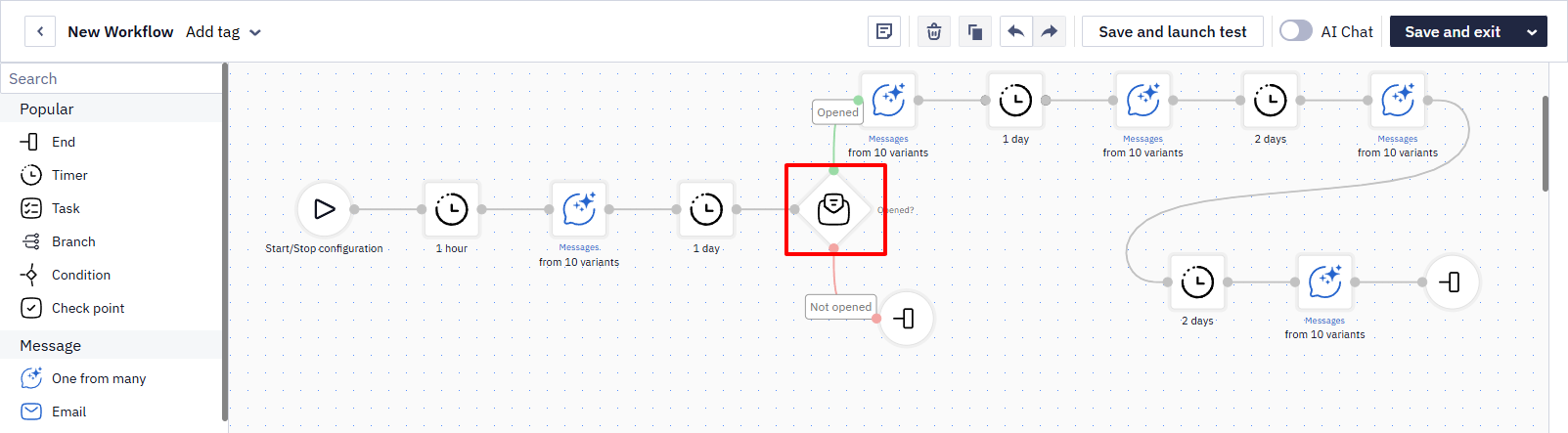
Limit communication with inactive contacts not only at the broadcast level but also within trigger series. If a contact did not open or click the first or second email in a sequence — for example, in an abandoned cart series — it is worth checking whether it makes sense to continue the series for them. For more precise logic, use clicks, purchases, or other interaction signals as stronger criteria, and treat opens as a supplementary trend signal.
In Yespo, this is configured in the workflow via a condition block after each message: if the contact has not performed the required action within a given timeframe, the workflow moves to the exit branch for that contact.
Content and Frequency
Mail providers evaluate not only technical settings but also recipient behaviour: opens, clicks, complaints, unsubscribes, and ignores. Content, subscriber expectations, and sending frequency must therefore be aligned.
Writing Emails
An email should be clear to both recipients and spam filters:
- do not make the email image-only — use real text;
- aim for approximately a 60/40 text-to-image ratio so filters can parse the content even if images are blocked;
- keep individual images under ≤100 KB;
- add alt text to images and use a responsive layout;
- avoid misleading subject lines, fake RE:/FWD: prefixes, or copy that disguises promotional content as transactional;
- do not embed images as base64 strings in the
srcattribute.
Embedded base64 images hurt deliverability. Mail providers treat emails with inline base64 images as suspicious, and Gmail, Yahoo, and several other clients do not render such images at all — the recipient sees an empty space instead of the picture. This applies to any image, including QR codes and logos. Upload the image to a hosting service and insert a link to it, which is what the Yespo editor does by default. See also Adding Tables to Emails.
Personalisation — name, recommendations based on browsing history or purchases, relevant categories — makes emails more useful to the contact and can increase clicks and opens while reducing unsubscribes.
Triggered emails are sent with a high-importance header, so Outlook marks them accordingly. If that is not what you want, contact support — the header can be turned off for your account.
Explaining Why the Contact Received the Email
Every marketing email should be clear to the recipient: who is writing, why they received the message, and how to unsubscribe. For example:
You are receiving this email because you subscribed to the Example online store newsletter.
This reduces the risk of spam complaints, especially if the contact has not interacted with your brand for a long time.
Unsubscribe Link
The unsubscribe link must be visible and easy to use. Do not hide it in small print. It is better to let someone unsubscribe easily than to receive a spam complaint — complaints damage domain reputation far more than regular unsubscribes.
Useful guides:
Subscription Categories
Not all subscribers of an online store are equally interested in every type of message. Use Subscription Categories to give customers control over the topics they receive. Example categories: sales and promotions, new arrivals, products from a specific brand or category, personalised recommendations. This reduces unsubscribes and improves relevance.
Frequency Control
In eCommerce, a single contact can appear in multiple communications simultaneously: a broadcast, an abandoned cart series, recommendations, post-purchase messages, and reactivation. Use:
- Annoyance Level — limits the number of Email and Mobile Push messages a contact can receive per day or per week.
- Broadcast Campaign Frequency Strategy — plans which days and which contact groups receive campaigns.
- Subscription Categories — give the contact control over message topics.
Warmup and Scaling
A new domain or a domain returning after a long pause should not be used immediately for broadcasts. Mail providers need to gradually see a stable volume, a quality list, and positive recipient behaviour.
How Automatic Warmup Works in Yespo
Yespo automatically warms up verified domains: early emails are signed with Yespo's DKIM, and the number of emails signed with your domain's DKIM gradually increases. Once warmup is complete, all emails carry two DKIM signatures — yours and Yespo's.
Example sending limits at 100,000 emails/day
| Day | Sending limit with your DKIM |
|---|---|
| 1 | 1,000 |
| 2 | 2,000 |
| 3 | 4,000 |
| 4 | 7,000 |
| 5 | 11,000 |
| 6 | 18,000 |
| 7 | 24,000 |
| 8 | 40,000 |
| 9 | 60,000 |
| 10 | 90,000 |
| 11 | 140,000 |
| … | … |
| 26 | unlimited |
At a daily volume of 100,000 emails, your DKIM sending limit reaches the required volume around day 11. Full warmup to unlimited sending takes until day 26. You can check the current daily limit in Settings → Domain Verification → Daily Sending Limit.
Limits apply to all campaigns equally, including triggered ones.
More: Domain Warmup
DMARC and Warmup Limits
If a strict DMARC policy (quarantine or reject) is set for your domain, some emails during warmup may fail the DMARC check, land in spam, or be rejected by the mail provider.
In that case, manually limit the daily send volume or temporarily switch the policy to none during warmup if this is consistent with your internal security rules. You can check current DMARC settings via MxToolbox.
The Right Audience for the First Send
Start warmup with the most reliable eCommerce segment — recent buyers: they recognise your brand and are more likely to open the email or click a link. Once metrics stabilise, gradually add wider segments:
- Recent buyers.
- Contacts with recent clicks.
- Active confirmed subscribers.
- Contacts with recent site visits or abandoned carts.
- Less active segments — only after stable results.
Do not start warmup with a cold list, old imports, or contacts without confirmed consent.
Transactional Messages as a Reputation Foundation
During warmup, transactional and service messages help generate positive signals from mail providers — they are expected and have high open rates:
- Double Opt-In confirmation;
- order confirmation;
- payment and shipping status updates;
- returns and invoices;
- post-purchase messages without aggressive promotion.
Do not mix service content with promotional copy in a way that makes the recipient unclear why they received the message.
Preparing for Seasonal Campaigns
Black Friday, Christmas sales, and other seasonal peaks require advance preparation. A sharp volume spike on the day of the campaign launch is a reputation risk. Before a major promo:
- Check your domain, signatures, and custom link domain.
- Review the metrics of previous campaigns by domain.
- Clean up or exclude inactive segments.
- Start with recent buyers and active subscribers.
- Gradually increase send volume.
- Monitor errors, complaints, unsubscribes, and CTR after each wave.
If metrics deteriorate — do not expand the audience. Stabilise deliverability first.
Pre-Launch Checklist
Before your first bulk campaign or major promo, verify:
Technical setup
- Domain is verified
- DKIM/SPF/DMARC are correctly configured
- The third-level domain being warmed up is clearly identified
- Related second-level domain subdomains have been checked
- Sender uses a corporate domain address
- Reply-to is set and the address is monitored
- Return-Path / technical bounce domain is checked according to the chosen domain authentication setup
- Custom domain for link shortening is configured
- Postmaster tools are connected
List
- List consists of confirmed contacts only
- Imported contacts have been verified and validated
- Inactive and risky segments are excluded
- First send is planned for recent buyers or another active segment
Content and frequency
- Email contains a visible unsubscribe link
- It is clear why the contact received the message
- Annoyance Level or another frequency control is configured
If Metrics Deteriorate After Launch
After launch, check in Yespo reports: delivery errors, spam complaints, unsubscribes, opens, clicks, and domain-level metrics. If complaints or errors are rising — do not scale campaigns.
Common Mistakes That Hurt Deliverability
- Sending a large one-off blast without warm-up — for example, a new or recently paused domain suddenly sending tens of thousands of emails in one batch. This is one of the fastest ways to damage a domain's reputation; follow warm-up even for a single large campaign, not just for new domains.
- Mailing a stale or unvalidated list — sending to an old list that hasn't been used or verified in a while causes a bounce-rate spike, which providers read as a reputation signal.
- Changing the FROM domain/address without re-warming — a new sending domain starts with no reputation regardless of how established your brand is; treat it like a new domain.
For detailed monitoring and response guidance: Email Deliverability: Monitoring and Control
Outgoing mail is sent over an encrypted connection — TLS 1.2. The encryption is visible in the headers of a received message.
Updated 11 days ago